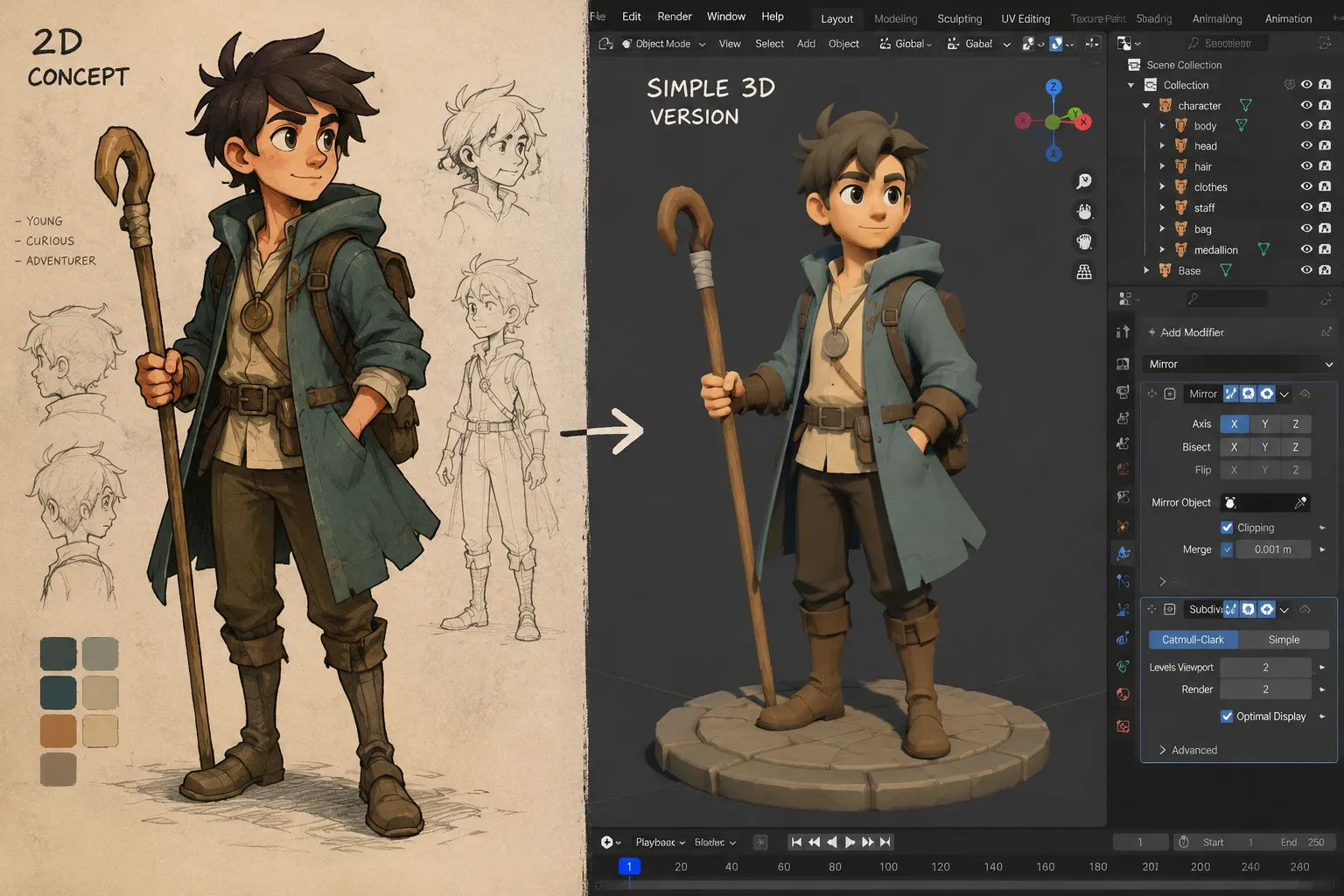
Quick verdict: You don't need to buy anything to start learning 3D as an illustrator. Adobe Project Neo (free, browser-based) is the easiest on-ramp if you want to add dimension to existing 2D work without a real learning curve. Blender (free, open-source) is the right next step if you want to actually model, sculpt, and render. Godot and Unreal Engine 5 are worth knowing about but are built for game development first — only reach for them once you know you want to go that direction.
If you've been paying attention to what's happening in illustration right now, you've probably noticed the same pattern everywhere: artists aren't trying to out-draw AI, they're diversifying around it. Learning 3D is one of the most common moves — not because 2D is dying, but because a 2D artist who can also model, sculpt, or build a simple 3D scene has more to offer a client than one who can't. This is a practical roadmap for 3D for 2D artists: what to actually install, what to try first, and what to skip until you know you need it.
Why Illustrators Are Picking Up 3D Right Now
3D isn't replacing illustration — it's becoming a second income stream and creative outlet for artists who already have strong fundamentals. Character designers are using 3D to turn flat concept art into turnaround sheets and game-ready assets. Editorial illustrators are using it to build dimensional scenes they can relight and re-shoot from any angle instead of redrawing perspective by hand. And because most of the serious tools are free, the barrier to trying it is time, not money.
Advertisement
The Four Free Tools Worth Knowing
Here's how they compare, ranked from easiest entry point to steepest learning curve:
| Tool | Cost | Best for | Learning curve | Runs on |
|---|---|---|---|---|
| Adobe Project Neo | Free (public beta) | Adding dimension to existing 2D/vector work | Very low | Browser (Chrome/Safari) |
| Blender | Free, open-source | Modeling, sculpting, rendering, animation | Moderate | Windows, macOS, Linux |
| Godot | Free, open-source | Lightweight interactive scenes and games | Moderate | Windows, macOS, Linux |
| Unreal Engine 5 | Free (royalty above $1M revenue) | Cinematic, high-fidelity real-time rendering | Steep | Windows, macOS |
Adobe Project Neo is the one most illustrators should try first, and it's the least "3D software"-feeling of the bunch. It runs entirely in your browser, lets you take a flat shape and rotate, extrude, and light it in three dimensions, then export it straight back out as an SVG you can drop into Illustrator or Photoshop. If your day-to-day is already in Adobe's ecosystem — see our Procreate vs. Photoshop comparison if you're still deciding on your main app — this is the lowest-friction way to see what "thinking in 3D" even feels like before committing to a full modeling program.
Blender is the actual industry-standard free 3D tool, and it's what most of the paid "3D for 2D artists" courses are built around. It has a real learning curve — the interface is dense, and it does everything from modeling to sculpting to animation to rendering — but it's also the tool with by far the most tutorials, forum support, and character-focused workflows built by other illustrators who made the same jump. If you're serious about turning a character design into an actual 3D model, this is where you'll end up eventually, so there's a case for starting here directly instead of treating Project Neo as a required first step.
Godot is worth knowing about specifically if part of your motivation is building small interactive pieces or games, not just static renders. It's lighter and faster to get a first result in than Unreal, with a gentler learning curve, and it's completely free with no royalty structure at any revenue level.
Unreal Engine 5 is the most powerful and the least beginner-friendly of the four. It's built for teams making high-fidelity real-time visuals and games, and the learning curve reflects that. Don't start here — but it's worth knowing it exists once you outgrow Blender's rendering capabilities or want to move into real-time cinematic work.
Your First Project Should Not Be a Full Scene
The most common mistake artists make when they start learning 3D is trying to build something as ambitious as their 2D work already is — a full character, fully rigged, in a detailed environment. That's a recipe for giving up in week one.
A better first project:
- Pick one existing character design you've already drawn — something simple, ideally without complex clothing or hair.
- Block out the basic forms only — head, torso, limbs as simple shapes. Don't touch details yet.
- Get it into a single pose, lit from one direction. That's it. That's the whole project.
- Render one image. Not an animation, not a turnaround — one still image that proves you can take a 2D idea into a third dimension.
That's a project you can realistically finish in a weekend in Project Neo, or a week or two in Blender if you're starting from zero. Finishing something small is what keeps you coming back to it — a half-finished ambitious scene is what makes people quit.
Where Free Stops Being Enough
Free tools will get you through your first project and probably your first few months. Where a paid resource starts to make sense is structured instruction — Blender specifically has a steep enough learning curve that a guided course (rather than scattered YouTube tutorials) can save you a genuinely large amount of time. If you want that structure, Skillshare's "Become a 3D Illustrator" course by Polygon Runway is built specifically for artists making this exact transition, rather than assuming a game-dev or VFX background.
Who Should Actually Do This
- Illustrators who want a second skill set that doesn't compete directly with AI-generated flat illustration
- Character designers who want to produce turnarounds, game-ready assets, or dimensional concept art
- Anyone whose current tools and workflow are solid — see our guide to starting digital art if you're not there yet — and wants a genuinely new creative challenge, not just a new app
Who Should Skip It For Now
- Anyone still building core drawing fundamentals — human anatomy for artists and general drawing skill will transfer into 3D and are a better use of limited time right now
- Anyone expecting 3D to be a fast income fix — it's a genuine skill with its own learning curve, not a shortcut
- Anyone without a machine that can run Blender or a modern browser for Project Neo — check our monitor settings guide and, if you're shopping for new hardware anyway, our Wacom Cintiq Pro 27 review — though for 3D specifically, a capable computer matters more than a high-end pen display
FAQ
Do I need to buy anything to start learning 3D as an illustrator? No. Adobe Project Neo and Blender are both fully free, and either one is enough to complete a real first project.
Is Blender hard to learn if I only know 2D illustration? It has a real learning curve, but your existing skills — anatomy, composition, lighting, color — transfer directly. The hard part is the interface and workflow, not the artistic judgment, which you already have.
Should I learn Blender or a game engine first? Learn Blender first unless you already know you specifically want to make games. Blender covers modeling, sculpting, and rendering — the core skills — while Godot and Unreal are built around making those assets interactive, which is a separate skill on top.
Will learning 3D actually help with AI competition? It won't make AI go away, but a 2D artist who can also produce 3D work is offering something a text-to-image prompt can't replicate as easily, and it opens income streams — game assets, product visualization, turnarounds — that pure 2D illustration doesn't.
The Bottom Line
You don't need a course, a subscription, or new hardware to find out if 3D is worth your time — Project Neo and Blender are both free, and a single-pose render of a character you've already designed is a realistic weekend project. Start there before you spend money on anything.
Sources used for facts
- Adobe Project Neo (Beta) FAQ — pricing, platform, and feature confirmation
- Adobe Project Neo (Beta) overview
- Epic Games — Unreal Engine pricing update announcement — confirms the $1M lifetime revenue threshold and 5% royalty rate for game developers (hobbyists and students remain free regardless); non-game companies over $1M revenue use a separate seat-based subscription, which the article simplifies since it doesn't apply to this audience
- Blender and Godot's free/open-source licensing is standard and well-documented; no threshold or royalty applies to either at any revenue level